UPDATE: the apple.com logo is now 152x152, they have scaled up some in the intervening years.
If you have a web page of any kind - blog, business, social network, whatever - take 3 minutes out of your day and hook this up.
Everyone has a fun little 16x16 favicon to sit in the bookmarks section, links bar, or tabs of their favorite browser (Flock, Songbird and Firefox come to mind). This has been a long-running tradition with webmasters and SEO companies to give you that last bit of branding: the favicon!
Now with mobile devices and desktop apps (rich internet applications, too?) getting into the mix, there is a need for favicons larger than squint. Enter, the apple-touch-icon and associated rel tag, which is even easier to implement than a favicon. No special file formats, no special programs needed. Instead of a screenshot of the web page, you now have a degree of control over a bookmarker's (webclipper's? that sounds nice) touchscreen.
All you have to do is name the thing apple-touch-icon.png and throw it in your document root. According to the primary vivid, it should be 57x57px, but that's actually the rendered size and not likely the size Apple uses internally. If you go to http://apple.com/apple-touch-icon.png, theirs is a nice round 129x129, which is roughly 2 1/4 times larger than 57x57. I figure Apple must know something we don't, so I'll play along.
And now, a handy diagram to show you what's up:
Favicon
16x16Apple Touch Icon
57x57Apple's Official Icon
129x129




Once you get your image loaded, borrow the boss' iPhone and add the webclip to your home page. There is also a preview screen that lets you know instantly if your icon is working (not pictured).
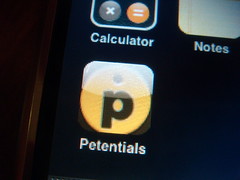
The iPhone even added a nice glossy, buttony finish to the experience. Ahhhhhh...! You'll also notice the edges of your icon may get trimmed (which caused the boss to make a face). This is, as far as I know, normal. If you don't want the boss to make a face, center the icon and leave some extra space around. Using the Apple example may be a helpful guide.
Last but not least, you may be wondering: "Why do I have to name my icon something so specific, and why do I have to use the document root?" Looks like you don't. Again our friends at vjarmy.com tell us that there is a rel-tag we can throw in the header if we want to place the icon elsewhere:
<link rel="apple-touch-icon" href="/path/to/my-cool-icon.png" />
If you don't want to use a .PNG, you have smelly feet, but if you're OK with being known as the smelly foot man, by all means, don't use the best web picture format. I also had to dissuade my boss from experimenting with transparency in the .PNG, because I'm quite afraid of the results. Imagine a person with a naked woman on their iPhone desktop; now imagine your company's logo displayed distastefully close to (or on top of) an unmentionable portion of said woman's body - with a transparent background! Yikes. I would feel very sorry for Six Apart on that day...
I find the apple-touch-icon tag to be a scoche proprietary for my taste, but so are iTunes tags in podcast RSS feeds, so I guess we must needs put up with a little bullcrap every now and then.
I also heard someone recently complain about sites that have a default iPhone interface, and I mostly agree. They should put the interface on a subdomain so you can get at the regular functionality of the site, but I believe a truly useful service should be user-friendly through multiple interfaces, and traditional web apps are not always suited to touch screens.
If you have any questions (or if I forgot something) buy all means, let me know.
I am also hoping to make a small and fun Drupal module that encourages you to upload a 129x129 image to use as your site's official webclip instead of a screenshot, so be on the lookout for that. Would you like to see other iPhone-friendly features integrated, like style sheet includes, javascripts, etc? I'd love to know.
Commenting on this Blog post is closed.
Comments
good little coverage of this.
good little coverage of this. I'll be making my apple-touch-icon very soon.