jump to navigation

Lijit Wijit makes a useful Search Landing Page November 21, 2007

Posted by Ryan in : Site News, Podcasts, TV, Netvibes, Trends, Standards, Wordpress, Virb, phone , add a comment

A nice follow-up to my last post about SEO and Landing Pages, Lijit!
Lijit Search Landing Page
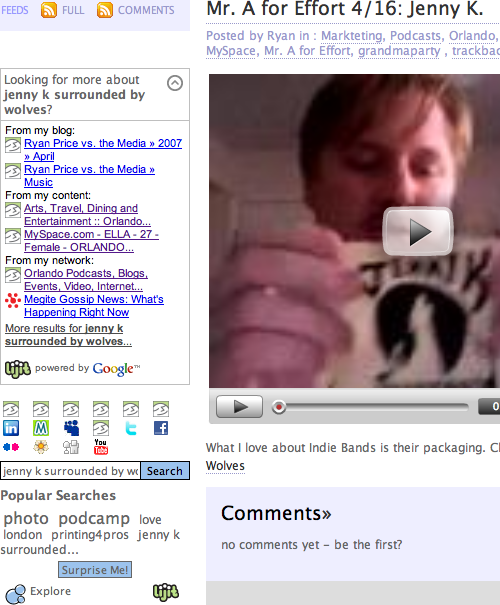
Lijit is a Google Personalized Search wrapper that helps you add all your sites and content to one search box. People can also search your MyBlogLog and LinkedIn networks, Ma.gnolia bookmarks and Twitter updates. Someone searching for “Jenny K Surrounded by Wolves” on my blog will see a search results page, but then when they return to my blog, Lijit picks up on the referrer and tries to suggest other stuff. Cool!

This page is a video I made about a local band, but if you look in the sidebar, you also see that we’ve referred to them on OrlandoScene.TV, so the person who came here looking for Jenny K might find what they were looking for on another one of my sites.

Mark Baratelli and I have talked about this problem before - we both blog in 23 places, so how can someone search all of our stuff? Do any of you fair readers use personalized search engines? I’m interested to see what else is out there.

Use Yahoo Site Explorer to get Top 10 Pages for your Site

Posted by Ryan in : Tech, Site News, Podcasts, SEO, Links, HowTo, Video, Trends, Wordpress, Web Sites, statistics, OrlandoScene, adsense , add a comment

A while back I installed an excellent plugin for Firefox called SearchStatus. In addition to showing me the pagerank and compete score of any page I visit (I think it does Alexa, but I have a different plugin for that), it also gives you this handy right-click menu with lots of neat stuff in it. Most useful was a list of all the pages that Google, MSN and Yahoo! index on your site. For this blog, the list is interesting, but I’m not trying to make a living being me, so I checked out OrlandoScene.TV, my up-and-coming video podcast.
From Google, most of the top pages were wordpress archive lists - not very interesting, but it does prove that older pages get more juice in Google. Here’s Google’s top 10 OSTV category pages:

  1. coffee
  2. podcasts
  3. relayforlife
  4. maitland
  5. austinscoffee
  6. pandos
  7. michelle
  8. theatre
  9. rogers
  10. loch haven park

Here’s Yahoo’s top 10 pages for OSTV:

  1. Orlando Scene TV
  2. OSTV on B & S Daily Market at Orlando Scene TV
  3. OSTV 03: Taste Restaurant at Orlando Scene TV
  4. OSTV Still Getting Started at Orlando Scene TV
  5. OSTV 01: Relay For Life Concert at Orlando Scene TV
  6. OSTV 02: Enzian FILMSLAM at Orlando Scene TV
  7. 2007 Orlando Fringe Festival at Orlando Scene TV
  8. Orlando Video Blog Kicks it Off at Orlando Scene TV
  9. orlandoscene.tv/feed
  10. 2007 archive at Orlando Scene TV

The MSN top 15 pages for OSTV (MSN was the only one with an RSS feed) were interesting as well. Kind of neat was every so often they would publish a date that specified the last time they indexed it (I think).

  1. Orlando Scene TV
  2. orlandoscene.tv
  3. orlandoscene.tv/feed
  4. orlandoscene.tv/comments/feed
  5. OSTV on B & S Daily Market …
  6. OSTV 01: Relay For Life …
  7. OSTV 03: Taste Restaurant …
  8. OSTV 02: Enzian FILMSLAM …
  9. Orlando Video Blog Kicks …
  10. Join us at E.L.L.A Music …
  11. Subscribe at Orlando …

I didn’t make those linkable because those are mostly in the yahoo list as well. It’s interesting to see where MSN puts pages vs. Yahoo! I don’t know how their algorithms differ, but it’s worth looking in to…? Also, MSN repeated the first result… why?

I think Google’s results are the least useful here (until I start optimizing and theming my category pages). For now, I have a neat wordpress plugin called Landing Pages that helps out by showing the user something like this:

orlando video coffee

You came here from www.google.com searching for orlando video coffee. These posts might be of interest:

* OSTV on B & S Daily Market
* Join us at E.L.L.A Music Festival
* OSTV 01: Relay For Life Concert

But I think each category - like coffee, theatre, etc. should have a graphic and some related posts like this. That’s also a great place to do some contextual advertising. I think I might throw adsense on my archive pages - especially since google thinks they’re so important.

Sharing Some Stats June 9, 2007

Posted by Ryan in : Tech, Site News, Markteting, Blogging, Podcasts, Orlando, Events, Video, Trends, Fringe, Wordpress, MySpace, Liberatr, Web Sites, statistics , add a comment

OK, now that the Fringe Festival is long over, and the spike in traffic for Blogging Fringe has come and gone, what do we have to show for it? Not as much as I’d like, really. The fact that lots of our content is spread across other sites (MySpace, YouTube) doesn’t really require anyone to use our site to get the content. With this audience, we don’t really need to worry about feeds taking away from our traffic.

fringe_may_stats.png
Note: As of today the daily average is 45 visitors.

The festival started on Friday, with a small event Thursday where I got to hand out some cards and meet some of the cast members and producers from shows. That’s where the traffic starts.When we reach the half-way point of the festival (Tuesday), the increase of traffic we were seeing just drops off, despite the fact that we had new and compelling content hitting the site, with myself and the street team pushing the site to everyone we met.

Here’s where I was stupid: Headline Animator. Feedburner tracks the stats for this dynamically-generated image, since they know you’re normally hosting it somewhere other than your site. You can even generate multiple headline animators and track them individually. A few months ago, I took the HA off of MySpace in favor of the more interactive SpringWidgets option. However, I’m now thinking that this kept people on MySpace more often.

What I should really do with headline animator (done now) is post one in the header of the MySpace Blog - the header appears at the top of every blog post and the blog home as well. A really great example of what to do with your blog header can be seen at the Six Characters MySpace Blog. They use an html image map with deep links to their site - so smart.

fringe_may_stats2.png

Last, here’s a breakdown of my visitors. It’s sad that Internet Explorer outnumbers Firefox 36 to 106 - maybe that’s a good cause to sprinkle some FireFox (or Flock, Songbird) banners around the site.

What’s the short list of things I’ve taken away from this experience? What am I going to aspire to for our next event (Orlando Puppet Festival)?

  1. Figure out how to get people coming before the event.
  2. Track MySpace views - Headline Animator will do nicely.
  3. Track MySpace Blog views with a second Headline Animator.
  4. Outfit the MySpace page and blog header with deep links to the site.
  5. Include links (and deep links) back to the main site in every MySpace blog.
  6. Try making a MySpace bulletin for every blog post on the main site.
  7. Consider including a “MySpace code” textbox in every post, a la YouTube.
  8. Invest in a Related Posts widget for the sidebar - who knows how much this could keep people on the site?
  9. Continue to seek out methods of Viral content like the Fringe Crush - people were hooked on new ones and were very eager to record one with us, though we didn’t see any user-generated videos this year.
  10. Push VoiceMail Reviews like nobody’s business - I waited too long to start pushing that idea, it could have worked out better.
  11. Consider posting Twitter inside the main blog chronology - after 24 hours, the posts don’t appear on the flash widget, but there was useful stuff going in there several times a day.
  12. Include more personality stuff (that’s normally my mantra), i.e. facetime. one of the most commented on video clips was a small part of the opening night video where I couldn’t get in to the VIP party.
  13. Form more artist relationships before the festival (coming back every year helps with this). Standing next to TJ Dawe and having him point out the podcast on my behalf was better (in context) than any marketing plan. Word of mouth was our #1 best campaign.
  14. Don’t forget to mention the day job and hand people cards when they ask about it. Blogging Fringe is also a portfolio piece, don’t forget to let it drive some business back to myself!

Howto: Include Wordpress Widgets in Post or Page Body April 8, 2007

Posted by Ryan in : Tech, Blogging, HowTo, Fringe, Wordpress, Web Sites , add a comment

I recently had a desire to make the homepage of a blog feel more like a portal - include a search box, updates coming in from around the web, a list of recent posts and links to other parts of the site that give more description than a simple blogroll. I ended up using Wordpress Widgets, runPHP and a little elbow grease to get it done. To see an example of this working live, visit Blogging Fringe - everything below the search box is a widget. I definitely recommend including widgets on a Page as opposed to a Post, but your needs may dictate otherwise.

  1. The first thing we need is to install and set up Wordpress Widgets. I won’t cover this, as the official tutorials and dozens of other places on the web do a great job of describing this process.
  2. Next we need the ability to run PHP code inside of a post. Coincidentally, we will be using a plugin called runPHP to accomplish this. There are other plugins to run code available, but this one worked for me. All you need to do is activate the plugin and check a box when you’re editing the page. This works for any PHP code, but we’re going to use it for calling a dynamic_sidebar in the body of a page.
  3. Before we can call the sidebar, we need to register a new one with Wordpress. I think this adds records to the database, but mainly it exposes a new box on the Widget options interface for you to drag widgets to. This thread on the Wordpress Support forums addresses the issue of adding multiple sidebars - particularly the comment by johnnyspade. You need to add some code to your functions.php file (in your theme directory) that looks a bit like this:
    if ( function_exists('register_sidebar') )
        register_sidebar(array(
    		'name'=>'sidebar1',
    		'before_widget' => '<li id="%1$s" class="widget %2$s"><div>',
    		'after_widget' => "</div></li>n",
    		'before_title' => '<h2>',
    		'after_title' => "</h2>n",
        ));
    
    if ( function_exists('register_sidebar') )
        register_sidebar(array(
    		'name'=>'sidebar2',
    		'before_widget' => '<li id="%1$s" class="widget %2$s"><div>',
    		'after_widget' => "</div></li>n",
    		'before_title' => '<h2>',
    		'after_title' => "</h2>n",
        ));


    When I did this, my original unnamed sidebar disappeared and I had to repopulate the list. Still, naming the sidebars is very important, because we need to be able to invoke them later in our page.

  4. Now that we’re all ready to run code, all we have to do is make a simple function call. With the multitude of widgets available, you can do most anything. Here’s the line I included in my post:
    <?php dynamic_sidebar('sidebar2'); ?>

Now I actually have a dynamic homepage that introduces my users to my blog and the related feeds, content, etc, while hopefully remaining useful and fresh all the while.

Comment Blitz! Sorry. February 21, 2007

Posted by Ryan in : Tech, Site News, Blogging, Trends, Wordpress , 1 comment so far

Wow, I actually got quite a few comments on my posts about MaxCast and Four Eyed Monsters, the Wine Haiku and others, but I have been neglecting my comments queue. I apologize to anyone who left comments. I get so much spam, I think I should get one of those 2 + 2 = ? systems like Mr. Josh Hallet.

If you’re a blogger, what has worked for you? How do you fight the forces of evil?

Blogging Fringe Blogtracker via Megite January 6, 2007

Posted by Ryan in : Tech, News, Markteting, Blogging, Podcasts, Orlando, Links, HowTo, Video, Trends, Fringe, Wordpress, MySpace, Liberatr, Web Sites , add a comment

See the blogtracker at megite.com/fringe

When I started Blogging Fringe I always thought people would get so excited by it they would want to contribute to the site. Well, everyone already has their own blogs, so I’ve come up with a better solution. Right now I have to manually add new feeds to an OPML file in order to include them in the algorithm’s tracking, but I don’t think it will be prohibitive. It is pretty nice to have that file where I can edit or back up my work as long as I have FTP.

I decided to call it “blogtracker” instead of memetracker, because I doubt the Fringe audience understands what a meme is any better than I do. (meaning I only have a vague idea)

I also added a video page with a few playlists hanging out (just like the Muppets one I posted yesterday), a contact form, and a page listing all of the shows for this year that will eventually be a rich metadata list with Microformats and everything.

Gallery 2 Integration with Wordpress May 6, 2006

Posted by Ryan in : Tech, Site News, Blogging, ryanprice.org, Reviews, Wordpress , add a comment

Does not work (at last not with this theme??). I have been playing with this crap for near on 6 hours with very little fruit. I got bunches of things fixed and added to my gallery, though. YAY for me!

This image used to be being loaded via a special quicktag which looked pretty neato.
Lipton's got no head!
The link points to the newest album, which directly corresponds to the old “Gallery” page on RyanPrice.org, where all the movies and rendered images live.

Probably most famous is the Devil Duckie movie, Of Death and Ducks.