jump to navigation

Smart Mailbox Formula: Flagged Messages October 29, 2008

Posted by Ryan in : , , , , , , ; add a comment

One very simple way to keep your email organized is by using flags in Apple’s Mail program. Starred If you’re like me, you are pulling in most, if not all, of your messages from a GMail or a Google Apps account. This means that your “starred” items in your Google Mail will also be “flagged” once they get to your Mac.

Flagging messages in Mail.app can be done via the menu Message > Mark > As Flagged, or by simply pressing Command-Shift-L when you have selected the message(s) you would like to flag.

New Smart MailboxCreating a Smart Mailbox is very simple. Just choose the menu item Mailbox > New Smart Mailbox…

At this point, you be presented with a popup box asking you for a Smart Mailbox Name, and several options. The first line of options reads:
Contains messages that match all of the following conditions:
You can also match TODO items, or ANY of the following conditions. For this example, we will leave this line alone.

The first condition by default matches the “From” email address of any messages. This is what we want to change:
Flagged Filter
Click on the select box for “From”, and choose Message is Flagged from the list. The other options in this condition will disappear.

Add a FilterThis Smart Mailbox is already pretty useful, but our Flagged messages from several months ago probably aren’t too useful any more, so we’ll add another rule. Click on the plus to the right of the popup box to add a new condition.

When you are finished creating this new rule, the second line should read:
Date Recieved is in the last 60 Days
Before you press OK, take a seecond to admire your work. You’re being smart with your email.
Date Received Filter

After you OK the creation of the new Smart Mailbox, a new “Flagged” item appears in the left sidebar of your Mail window with a little purple icon. If you don’t see it, click the words SMART MAILBOXES until the arrow to the left of the words is pointing down, and your Smart Mailbox should appear.

Flagged Folder All of your flagged messages from the last 60 days are in this smart mailbox, but they have not been moved from their home in your other mailboxes either. If you remove the flag from a message with Command-Shift-L, the message will no longer appear here.

While this is all great, I did notice one annoying thing: Since all my mail is coming in from a GMail server, several of the messages in this folder were duplicates, because they also appear in GMail’s “Starred” folder. In order to fix this problem. I selected my Smart Mailbox, and then chose the menu item Mailbox > Edit Smart Mailbox…

Once you’re editing again, just add a rule that reads as follows:
Message is in Mailbox: Inbox
After you OK this change all your duplicate GMail messages should disappear.

If you’ve got a Smart Mailbox Formula that helps you wade through the ocean of information we all seem to be swimming in these days, please share it in the comments below. I’m sure we could all use a little bit of help.

Use Smart Mailboxes to Organize Your Email October 26, 2008

Posted by Ryan in : , , , , , , ; add a comment

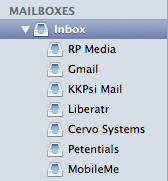
If you’re anything like me, you tend to hold on to your email for months, years, or pretty much all of eternity. All Mailboxes Now that I have things like Google Apps for Your Domain and IMAP, I can literally keep as much of my email as I want, and always get access to my full message history. On top of this, I have 7 inboxes to check.

There are several advantages to this system as far as I can see - I never have to worry that someone has the wrong email address, or one I no longer use, because I always know the message will arrive on my desktop, but at the same time live somewhere on dark and dank hard drive deep in the Google infrastructure, wherever that may be.

Messages Today: 20 Here is my big problem: I get dozens of messages a day. On the day I wrote this tutorial I had received 20 messages by noon! How on earth am I supposed to keep track of the messages I want to keep, without abandoning my pack rat nature?

My solution for now: Smart Mailboxes. You’ve at least seen Smart Playlists in iTunes - the program ships with a few of them baked in. The Finder also features a few pre-selected searches under “search for” on Leopard. Apple’s Mail.app has had Smart Mailboxes for some time now, and it’s about time you got a little more insight into what is going on with your mail.

Saved Search The very simplest way to create a Smart Mailbox is to use the little search box in the top right of your Mail window and push the Save button. That’s really all there is to it. You can choose a few simple options from the popup box - the application has already chosen a sensible folder name for you, based on what you searched. You could try searching for something related to a big project you’re working on, or all the messages from a particular friend, or a group of friends. The possibilities are endless.

What are some of your favorite Smart Mailbox formulas? I’d love to see them in a comment.

Chris Pirillo’s iPhone Rant, plus Why no Flash July 3, 2007

Posted by Ryan in : , , , , , , , , , , , , , , ; 2 comments

I started this morning with “The iPhone doesn’t have video”. That is Chris’ reason #17 of 20 reasons why he didn’t buy an iPhone on day 1. I agree with several of his points. This video is about 20 minutes long - I found it very easy to watch the whole thing, despite the fact that Chris gets a little agitated at times during the video.

The iPhone Rant ~ The Chris Pirillo Show

Chris | Live Tech Support | Video Help | Add to iTunes

I also saw a fantastic post on RoughlyDrafted.com called The iPhone Threat to Adobe, Microsoft, Sun, Real, BREW, Symbian. The gist of the article is this:

If Apple’s purposeful omission of Flash on the iPhone is giving you déjà vu, it’s probably because Apple did the very same thing to rid the world of Microsoft’s domination of the online music, media, and DRM industry.

Three years ago, Apple refused to include support for Windows Media on the iPod. That resulted in the online music market being opened up and pushed toward the vendor agnostic MPEG AAC format.

The exclusion of flash makes sense. Embed a multimedia object that can be played by your local player - in this case, Quicktime, but the files (MP4, MP3, AAC) are open standards so any environment with a native player should support them. I think Zune plays AAC… I know PSP does. Everyone plays MP4 - everyone.

As for video recording, this tweet by Scott points to a PDF that supposedly says iPhone includes an h.263/h.264 encoder as well as decoder - meaning it should be able to do videoconferencing (that’s h.263) and recording. When that comes and the price drops about $250, I’ll consider iPhone again.

I’m not buying iPhone July 2, 2007

Posted by Ryan in : , , , , , , , , ; add a comment

I was thinking about recording a video about why I won’t be getting an iPhone, but Uncle Loren has it taken care of…

Why I Won’t Get An iPhone | 1938 Media

New Header Image March 7, 2007

Posted by Ryan in : , , , , , ; 1 comment so far

I don’t think anyone who regularly reads this blog thinks they won’t see posts like this every now and again - so to the people reading this post via RSS (and a few on email), visit the site and leave a comment about the header image I just put together waiting for some video to capture.

Link to the old image for comparison. I could tell you the message I’m trying to get across with the image, or you can figure it out for yourself.

Like the last header, I took this picture with my built-in iSight and edited it with the Gimp.

MacBook Pro Optical SuperDrive Rejects 1 in 4 Discs February 23, 2007

Posted by Ryan in : , , , , , ; 1 comment so far

I am ready to visit a Mac Genius and make them replace this piece of shit drive. Every 4th disc, CD/DVD, gets rejected from the drive - sometimes trying again works, other times, I can try 10 times with no positive result. The first time I noticed this was Harry Potter on DVD.

At first I thought it was Warner Brothers trying to protect themselves from piracy, but then I tried a bunch of (good) burned discs, all with the same effect. Also, my volume 2 of Firefly is rejected, but the others work fine. Sure, these discs might have a tiny abnormality, but the thing just spins and spins and then spits the disc out! There is no way to mount the disc or override this function as far as I know. This is what I consider broken and I want a new one.

Support for my claim: MacBook Pro: Optical Drive

Update: The AppleCare disc was rejected the other day - that is my closing argument for when I go get someone to replace this thing.

Update: About a month later I took my MacBook in to the Apple store for repairs as I was going on vacation - the Millenia sroe was closed for renovations, so I went to the Florida Mall store, and the Mac Genius was very helpful. I proved the drive was busted, gave them my administrator password and went out of town, lugging my old PC laptop. When I came back, my MacBook Pro was as good as new and I haven’t had any problems burning since. I wish I could have upgraded to a dual-layer drive, but I guess you get what you get.

Automator Burn to Disc Workflow October 28, 2006

Posted by Ryan in : , , , , ; add a comment

In an effort to scratch my own itch, I remembered a time when I wanted to burn some files to data CD or DVD and thinking “there must be an easier way to do this”. Enter Automator, basically the most powerful and underused feature on any Mac.

I created a simple workflow I called “Burn to Disc…” that I installed to the right-click menu of my Finder. Now I just select one or more files in the Finder (they need to all be in the same directory in this case) and choose Automator > Burn to Disc… No software needed.
Automator Burn to Disc Workflow
I decided to to use the actions “Get Selected Finder Items” and “Burn a Disc”. Then I chose to “Save as Plugin…” to the Finder, which means it shows up in the right-click (ctrl + click) menu.

If you are making workflows that act on files in the Finder, choose File > Save as Plug-in… Then name your plugin and choose Finder. The option will show up when you right-click or ctrl+click on any number of finder items. To select multiple items, use shift+click or cmd+click.
Automator Save as Plug-in
You can also choose to save the plug-ins to Folder Actions, iCal Alarm, Image Capture, Print Workflow or Script Menu. Think: iCal Alarm = CRON Jobs from Unix, or Scheduled Tasks from Windows. Send an email at 3PM, destroy an incriminating file at a future date, send that virus to everyone on the network days after you’ve left on vacation.

If you are an RSS subscriber, there are also 2 more quick examples there… oooh! RSS only features! How does he do it? Thanks Feedburner!

Screencast about Screen Grab Software iShowU October 9, 2006

Posted by Ryan in : , , , , , , ; add a comment

My first screencast ever, made with $20 shareware app iShowU and free sound capture application Soundflower. You can record directly to H.264 and a slough of other codecs, but I recorded to Apple Animation, which made a ~ 600MB file, which I compressed with Quicktime Pro down to 60MB.

Instructr - 00 - iShowU
Screen Capture using iShowU

I also registered a new domain, about which I will reveal more later.

Photos by Flickr

MacBook Random Shutdowns For Real? September 27, 2006

Posted by Ryan in : , , , , , ; add a comment

Dave Winer has been complaining for weeks about his new MacBook randomly shutting down. Leo, Merlin, Alex and the gang over at MacBreak Weekly have been talking about mooing. Apparently the MacBook Pro doesn’t have these problems. I’m glad I spent the extra dough.
Scripting News: 9/27/2006 Random Shutdowns
“Affected MacBooks span the serial number range 4H617-4H635.”

I like the bigger screen and the lighted keyboard. Glossy screen is a plus, but you can get that on the small one. I also wanted a video card so I can do video stuff, so that’s a nice perk and it was the deal maker for me. I don’t know if I’ll ever use the ExpressCard/34 slot, but we’ll see. Maybe an EVDO card or some GPS fun…

First post from the PowerMac December 30, 2005

Posted by Ryan in : , , , ; add a comment

I love this thing. Really.

HA HA! Linux!

Oh, it’s uber-early, why am I still up? Why can’t I go to bed like a normal person?

Yay for gaming.

End of line.